Keep your rental records in a spreadsheet for Making Tax Digital
The Plaincolumn Landlord Workbook gives you a clear spreadsheet for those records, and exports your records as a CSV file, using HMRC's category names.
Record-keeping tool only. It's not tax advice and not HMRC-recognised software.
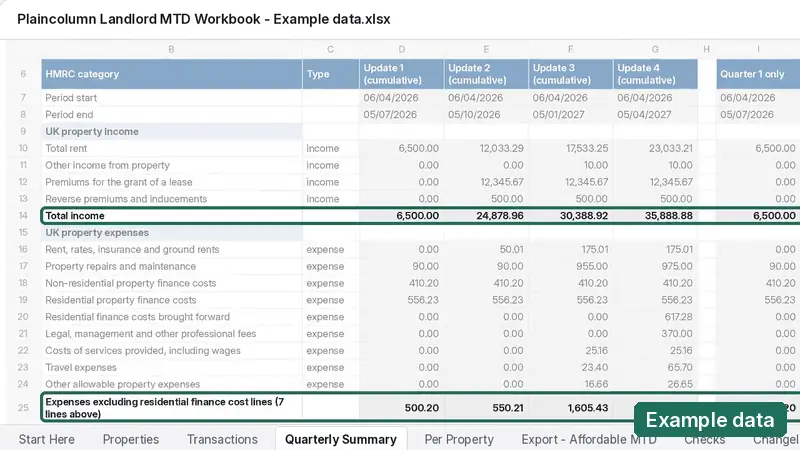
| Period end | Total income (cumulative) |
|---|---|
| 05/07/2026 | 6,500.00 |
| 05/10/2026 | 24,878.96 |
| 05/01/2027 | 30,388.92 |
| 05/04/2027 | 35,888.88 |
What changes in April 2027
From 6 April 2027, sole traders and landlords whose qualifying income from self-employment and property was over £30,000 in the 2025 to 2026 tax year will need to keep digital records and send quarterly updates to HMRC using software that HMRC recognises for Making Tax Digital.
The threshold drops to £20,000 from April 2028.
HMRC reviews your Self Assessment return each year and writes to you if your income is over the threshold.
Read HMRC's guidance on GOV.UK: Find out if and when you need to use Making Tax Digital for Income Tax.
Three things to do each quarter
-
Record
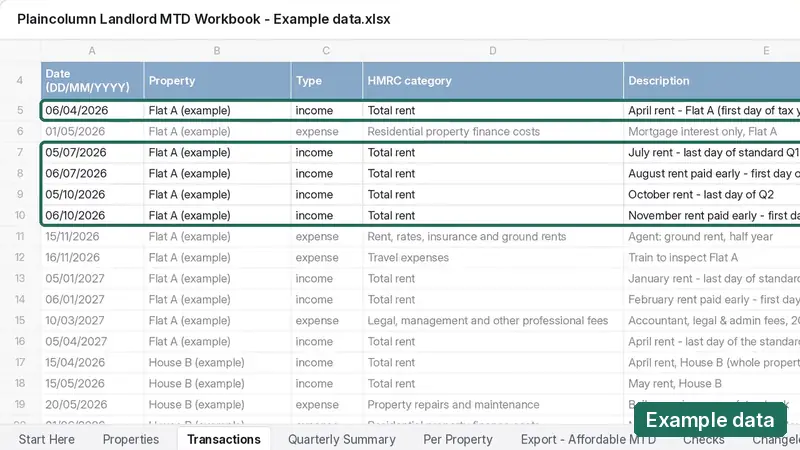
Records income and expenses for up to 10 UK properties, including ownership shares.
Example data -
Check the quarter
Gives you a summary for each quarter.
Example data -
Export the CSV
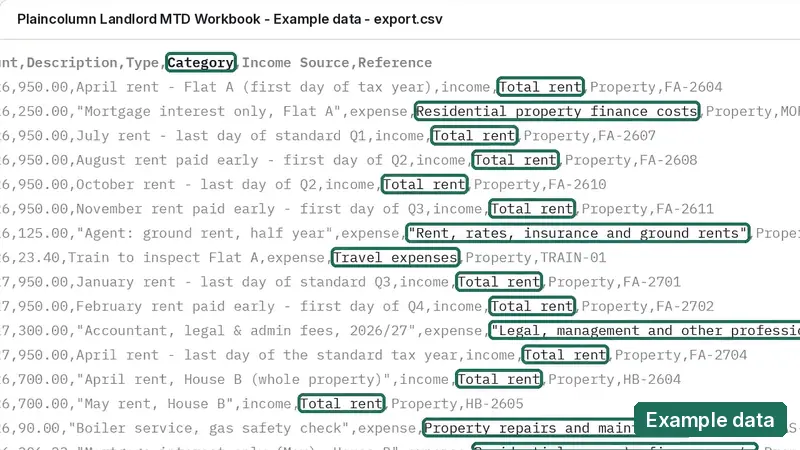
Exports your records as a CSV file, using HMRC's category names.
Example data
Why landlords choose Plaincolumn
Keep your own spreadsheet. Your records stay in a file you own and can open any time. No new app to learn.
Pay once. £19, with free updates for HMRC rule changes up to 5 April 2028. No subscription.
Made only for UK landlords. HMRC's property income and expense categories are already set up, so you can start straight away.
Private by design. Your figures stay in your own file. We never see them, and this site uses no cookies or tracking.
Try it first. Start with the free sample: one property, first quarter.
A spreadsheet or a subscription?
Both are reasonable ways to keep MTD records. Here's what to compare.
| Plaincolumn workbook | Subscription software: worth checking | |
|---|---|---|
| How you pay | Once, £19 | Is it a monthly or yearly fee? |
| Where your records live | In your own spreadsheet file | Are your records kept in the provider's online account? |
| What it's built for | UK rental property only | Is it made for landlords, or for every kind of business? |
| Sends updates to HMRC | No. Exports your records as a CSV file, using HMRC's category names | Software that HMRC recognises for MTD does this |
| Try before you pay | Free sample | Is there a free trial? |
Record-keeping tool only. It's not tax advice and not HMRC-recognised software. To send quarterly updates you'll also need software that HMRC recognises for Making Tax Digital.
Start free, upgrade if it suits you
| Free sample | Full workbook | |
|---|---|---|
| UK properties | 1 | Up to 10 |
| Ownership shares | Yes | Yes |
| Tax years | 2026/27, first quarter only | 2026/27 and 2027/28 |
| Summary for each quarter | Yes, first quarter | Yes |
| CSV export | Yes | Yes |
| Price | Free | £19 |
What it doesn't do
It doesn't cover foreign property, self-employment income or tax calculations. It can't submit anything to HMRC, and it doesn't replace HMRC-recognised software or an accountant.
Questions landlords ask
Is this tax advice?
No, it's a record-keeping tool only. It's not tax advice and not HMRC-recognised software. For advice about your own situation, speak to a qualified accountant or tax adviser, or check HMRC's guidance on GOV.UK.
Do I need Making Tax Digital for Income Tax?
You need it if your qualifying income from self-employment and property is over HMRC's threshold: over £30,000 in 2025 to 2026 means starting from 6 April 2027, and over £20,000 in 2026 to 2027 means starting from 6 April 2028. GOV.UK We can't tell you whether it applies to you, so check HMRC's guidance: Find out if and when you need to use Making Tax Digital for Income Tax. Our page “Do I need Making Tax Digital for Income Tax, and when?” explains more.
Can I keep using a spreadsheet?
Yes, HMRC says you can keep using spreadsheets, but you'll need software that links to them (bridging software) to send updates. GOV.UK
Does this workbook send anything to HMRC?
No, it can't submit anything to HMRC. To send quarterly updates or returns you'll need HMRC-recognised software, and you can find the list on GOV.UK.
What's the export for?
Exports your records as a CSV file, using HMRC's category names. We make no claims about any bridging software.
What does it cover?
Up to 10 UK properties, including ownership shares, for the 2026/27 and 2027/28 tax years. It doesn't cover foreign property, self-employment income or tax calculations.
What's in the free sample?
1 property, first quarter only. Gumroad asks for your email to deliver the file; we won't use it for marketing unless you opt in.
What happens after I pay?
Gumroad sends you a download link straight away.
Who you're buying from. Plaincolumn products are sold through Gumroad, which acts as the reseller and merchant of record. Gumroad takes your payment, issues your receipt and VAT invoice, and processes any refund. EvoHuman Ltd, trading as Plaincolumn, is the creator of the workbook.
Your right to cancel. You can cancel within 14 days of purchase for a full refund, even if you've already downloaded the workbook. Email support@plaincolumn.co.uk with your order email, and we'll arrange the refund through Gumroad. Refunds go back to your original payment method.
If something's wrong. If the workbook is faulty, doesn't match its description, or doesn't work as described, you're entitled to a fix or a replacement. If we can't fix it, you're entitled to a refund. This is your legal right under the Consumer Rights Act 2015, and nothing in this policy affects it.
Updates. You'll get free fixes for any error, plus free updates for HMRC rule changes up to 5 April 2028. They're delivered through Gumroad to the email you bought with.
If we stop providing updates. If we stop providing updates before 5 April 2028, we'll email every buyer at their purchase email. Anyone who asks within 30 days of that email will get a full refund. We'll process it through Gumroad, or pay it to you directly if Gumroad can no longer process it.